Users
Overview
An administration page for all the users registered to your store. You can create API users, bind an API key to an existing user, modify existing API permissions on a user, unbind users from SSO and straight up delete user profiles from Zervicepoint.

Users table info
| Column | Description |
|---|---|
| Name | The user's name |
| The user's email | |
| API key status | Shows whether the user has an API key bound or not |
| SSO binding | Shows whether the user is bound to an SSO account or not |
Users table actions
| Icon | Action | Description |
|---|---|---|
 |
Add/Manage API key | Adds an API key or manages the API key permissions for the profile |
 |
Unbind | Removes the profile's SSO binding |
 |
Delete | Removes the user profile from Zervicepoint |
Temporary users
A temporary user has limited access to your Zervicepoint store without needing a user account. All they need is a valid email address and the link generated by filling out the form that appears when you click Create temporary user.
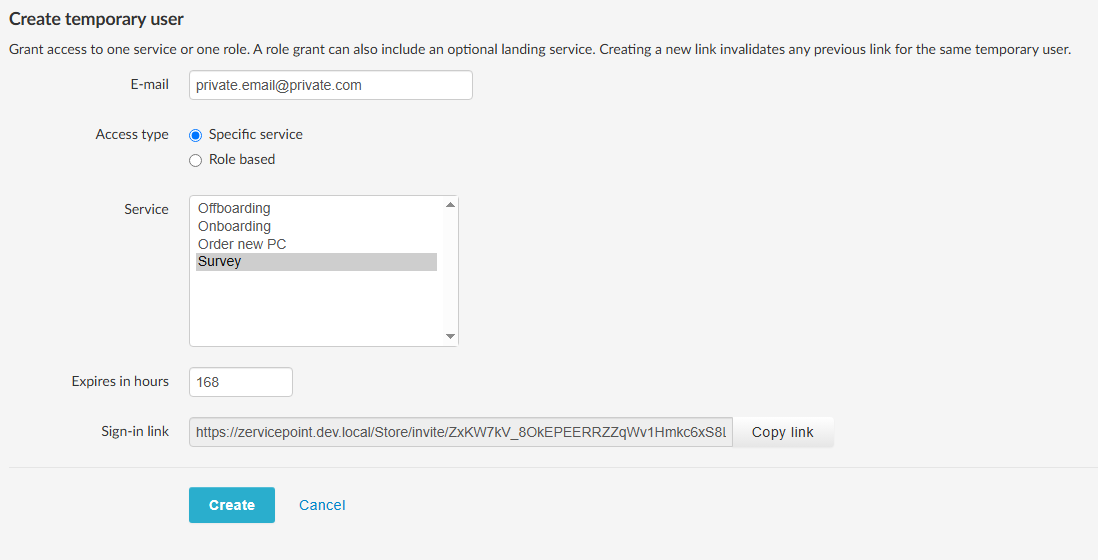
You can disable this feature in the General tab in Edit store
General fields
| Field | Description |
|---|---|
| Email address of the user who will be granted temporary access | |
| Access type | Choose Role based or Specific service. Your selection determines which additional fields appear below |
| Expires in hours | Select how many hours the temporary user should remain active |
If you select "Role Based"
| Field | Description |
|---|---|
| Role | Select the role to assign to the temporary user |
| Landing service | Select the service the temporary user should be directed to when accessing Zervicepoint |
If you select "Specific service"
| Field | Description |
|---|---|
| Service | Select the services the temporary user should have access to |
After you select Create
The Sign-in link appears. The temporary user uses this link to access Zervicepoint. It stops working when the access expires or the user is removed from the users list.